#swap
wget -O box.sh https://raw.githubusercontent.com/BlueSkyXN/SKY-BOX/main/box.sh && chmod +x box.sh && clear && ./box.sh
18 / 2048
#xray @ AlmaLinux OS 9 64 Bit
bash <(curl -sL https://raw.githubusercontent.com/daveleung/hijkpw-scripts-mod/main/xray_mod1.sh)
#Hestia CP @ Debian 11 64 bit
apt update -y
apt install wget curl sudo vim git
wget https://raw.githubusercontent.com/hestiacp/hestiacp/release/install/hst-install.sh
sudo bash hst-install.sh --apache no --phpfpm yes --multiphp yes --vsftpd no --proftpd yes --named yes --mysql yes --postgresql no --exim yes --dovecot yes --sieve no --clamav yes --spamassassin yes --iptables yes --fail2ban yes --quota yes --api yes --interactive yes --with-debs no --port 488 --hostname host.name.com --email [email protected] --password password --lang zh-cn --force
#Hostname @RackNerd
vim /etc/hosts
i
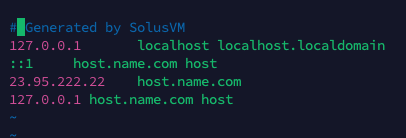
esc | :wq | reboot
v-add-letsencrypt-host
#x-ui @ Debian 11 64 bit
bash <(curl -Ls https://raw.githubusercontent.com/vaxilu/x-ui/master/install.sh)
#open 8888
vim /home/Hash/conf/web/name.com/
#nginx.conf
  location ^~ /xray {
      proxy_pass http://127.0.0.1:8888/xray;
      proxy_set_header Host $host;
      proxy_set_header X-Real-IP $remote_addr;
      proxy_set_header X-Forwarded-For $proxy_add_x_forwarded_for;
  }
  location /us  {
          proxy_redirect off;
          proxy_pass http://127.0.0.1:46031;
          proxy_http_version 1.1;
          proxy_set_header Upgrade $http_upgrade;
          proxy_set_header Connection "upgrade";
          proxy_set_header Host $http_host;
          proxy_read_timeout 300s;
          # Show realip in access.log
          proxy_set_header X-Real-IP $remote_addr;
          proxy_set_header X-Forwarded-For $proxy_add_x_forwarded_for;
  }
nginx -s reload
Etc/UTC
#Pass
Hello World @ iStoreOS
Shadowrocket @ iOS