Built-in charsets
- ?l = abcdefghijklmnopqrstuvwxyz
- ?u = ABCDEFGHIJKLMNOPQRSTUVWXYZ
- ?d = 0123456789
- ?h = 0123456789abcdef
- ?H = 0123456789ABCDEF
- ?s = «space»!”#$%&'()*+,-./:;<=>?@[\]^_`{|}~
- ?a = ?l?u?d?s
- ?b = 0x00 – 0xff
第一梯队
华硕ROG-3080,七彩虹火神-3080,影驰乐高-3080,七彩虹ADOC-3080
第二梯队
华硕TUF-3080,七彩虹ULTRA-3080,七彩虹战斧-3080,影驰星耀-3080
第三梯队
影驰金属大师-3080,微星超龙-3080,技不如人嘉魔鹰-雪鹰-3080
第四梯队
耕升炫光-3080,索泰天启-3080,索泰PGF-3080
第五梯队
映众超级冰龙-3080,影驰黑将-3080,微星魔龙-3080
微星万图师-3080,耕升星极红蓝爵-3080,耕升追风-3080
特别推荐:影驰名人堂3080Ti(非金标就很好) 3080TI
特别不推荐:华硕TUF-3080Ti
Linux:
~/.bitcoin/
MacOS:
~/Library/Application Support/Bitcoin/
Windows:
%APPDATA%\Bitcoin
(This defaults to C:\Documents and Settings\YourUserName\Application data\Bitcoin on Windows XP and to C:\Users\YourUserName\Appdata\Roaming\Bitcoin on Windows Vista, 7, 8, and 10.)
* Device #1: NVIDIA GeForce RTX 4090, 23867/24252 MB, 128MCU
34064 H/s (78.48ms) @ Accel:4 Loops:1024 Thr:1024 Vec:1
* Device #1: NVIDIA GeForce RTX 3090 Ti, 23963/24245 MB, 84MCU
16138 H/s (431.69ms) @ Accel:128 Loops:256 Thr:512 Vec:1
* Device #1: GeForce RTX 3070, 7531/7979 MB, 46MCU
8768 H/s (54.85ms) @ Accel:8 Loops:256 Thr:1024 Vec:1
* Device #1: GeForce GTX 1050 Ti, 1009/4037 MB allocatable, 6MCU
1345 H/s (96.58ms)
# Nvidia GPU: 14 * RTX 3090
--------------------------------------------------------------------
* Hash-Mode 11300
--------------------------------------------------------------------

Speed.#1.........:    14679 H/s (463.95ms) @ Accel:64 Loops:256 Thr:1024 Vec:1
Speed.#2.........:    14589 H/s (469.37ms) @ Accel:32 Loops:1024 Thr:512 Vec:1
Speed.#3.........:    14882 H/s (457.55ms) @ Accel:64 Loops:256 Thr:1024 Vec:1
Speed.#4.........:    14295 H/s (479.03ms) @ Accel:32 Loops:1024 Thr:512 Vec:1
Speed.#5.........:    15198 H/s (447.96ms) @ Accel:64 Loops:256 Thr:1024 Vec:1
Speed.#6.........:    14441 H/s (474.18ms) @ Accel:32 Loops:1024 Thr:512 Vec:1
Speed.#7.........:    14828 H/s (459.21ms) @ Accel:64 Loops:256 Thr:1024 Vec:1
Speed.#8.........:    14351 H/s (477.16ms) @ Accel:32 Loops:1024 Thr:512 Vec:1
Speed.#9.........:    14115 H/s (482.45ms) @ Accel:64 Loops:256 Thr:1024 Vec:1
Speed.#10.........:    14645 H/s (467.56ms) @ Accel:32 Loops:1024 Thr:512 Vec:1
Speed.#11.........:    15016 H/s (453.46ms) @ Accel:64 Loops:256 Thr:1024 Vec:1
Speed.#12.........:    14165 H/s (480.89ms) @ Accel:64 Loops:256 Thr:1024 Vec:1
Speed.#13.........:    14887 H/s (457.40ms) @ Accel:64 Loops:256 Thr:1024 Vec:1
Speed.#14.........:    14624 H/s (468.23ms) @ Accel:32 Loops:1024 Thr:512 Vec:1
Speed.#*.........:   204.7 kH/s
slmgr /ipk NRG8B-VKK3Q-CXVCJ-9G2XF-6Q84J
slmgr /skms kms.loli.best
slmgr /ato
apt update -y
apt install wget curl sudo vim git
git clone https://github.com/a137x/plutus-rustus.git
cd plutus-rustus
apt install cargo
curl –proto ‘=https’ –tlsv1.2 -sSf https://sh.rustup.rs | sh
cargo rustc –release — -C target-cpu=native
bash start.sh & disown
#swap
wget -O box.sh https://raw.githubusercontent.com/BlueSkyXN/SKY-BOX/main/box.sh && chmod +x box.sh && clear && ./box.sh
18 / 2048
#xray @ AlmaLinux OS 9 64 Bit
bash <(curl -sL https://raw.githubusercontent.com/daveleung/hijkpw-scripts-mod/main/xray_mod1.sh)
#Hestia CP @ Debian 11 64 bit
apt update -y
apt install wget curl sudo vim git
wget https://raw.githubusercontent.com/hestiacp/hestiacp/release/install/hst-install.sh
sudo bash hst-install.sh --apache no --phpfpm yes --multiphp yes --vsftpd no --proftpd yes --named yes --mysql yes --postgresql no --exim yes --dovecot yes --sieve no --clamav yes --spamassassin yes --iptables yes --fail2ban yes --quota yes --api yes --interactive yes --with-debs no --port 488 --hostname host.name.com --email [email protected] --password password --lang zh-cn --force
#Hostname @RackNerd
vim /etc/hosts
i
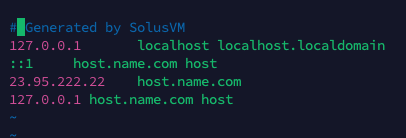
esc | :wq | reboot
v-add-letsencrypt-host
#x-ui @ Debian 11 64 bit
bash <(curl -Ls https://raw.githubusercontent.com/vaxilu/x-ui/master/install.sh)
#open 8888
vim /home/Hash/conf/web/name.com/
#nginx.conf
  location ^~ /xray {
      proxy_pass http://127.0.0.1:8888/xray;
      proxy_set_header Host $host;
      proxy_set_header X-Real-IP $remote_addr;
      proxy_set_header X-Forwarded-For $proxy_add_x_forwarded_for;
  }
  location /us  {
          proxy_redirect off;
          proxy_pass http://127.0.0.1:46031;
          proxy_http_version 1.1;
          proxy_set_header Upgrade $http_upgrade;
          proxy_set_header Connection "upgrade";
          proxy_set_header Host $http_host;
          proxy_read_timeout 300s;
          # Show realip in access.log
          proxy_set_header X-Real-IP $remote_addr;
          proxy_set_header X-Forwarded-For $proxy_add_x_forwarded_for;
  }
nginx -s reload
Etc/UTC
#Pass
Hello World @ iStoreOS
Shadowrocket @ iOS
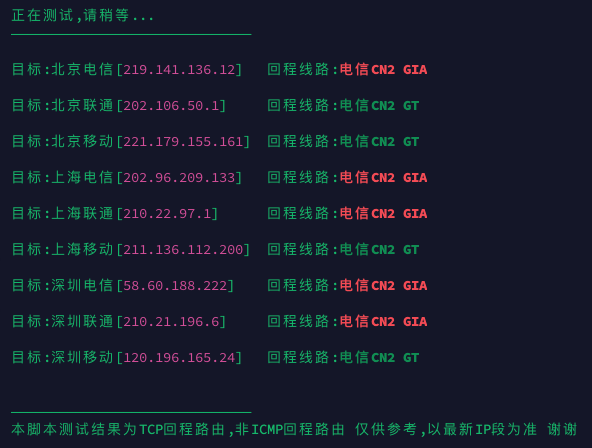
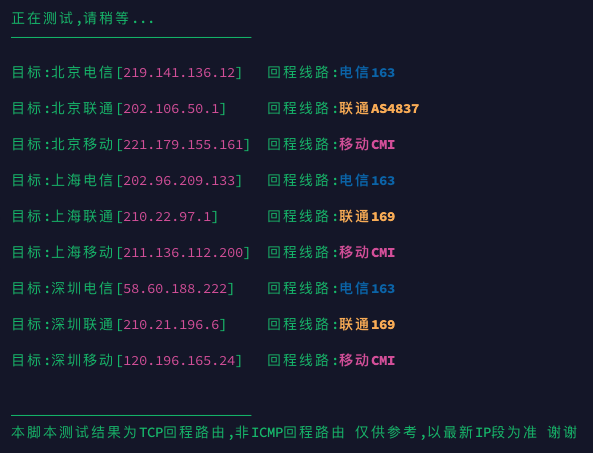
# 检测回程脚本
curl https://raw.githubusercontent.com/zhucaidan/mtr_trace/main/mtr_trace.sh|bash
# 测试结果
Bandwagon @ Ubuntu 22.04 x86
KVMV3-20G-1G-1T-CA-CN2GIA |California , CA
RackNerd @ Debian 11 64 bit
KVM-30G-1.5G-3T |San Jose, CA
#swap
wget -O box.sh https://raw.githubusercontent.com/BlueSkyXN/SKY-BOX/main/box.sh && chmod +x box.sh && clear && ./box.sh
18 / 2048
#aapanel
apt update -y
apt install wget curl sudo vim git
@ Ubuntu 22.04 x86
apt install -y wget && wget -O install.sh http://www.aapanel.com/script/install_6.0_en.sh && bash install.sh forum
@ AlmaLinux OS 9 64 Bit
yum install -y wget && wget -O install.sh http://www.aapanel.com/script/install_6.0_en.sh && bash install.sh forum
/etc/init.d/bt default
bt